- Home
- >
- Microsoft Teams Integration
Microsoft Teams Integration
Revolutionize teamwork: PCPx seamlessly integrates with Microsoft Teams for ultimate efficiency and collaboration. Accelerate projects, streamline communication, and maximize results – all in one platform. Welcome to the future of seamless collaboration.
Empower Your Teams: Achieve More with the Merger of PCPx and Microsoft Teams
Integrate PCPx Into Your Existing Project Processes
Seamless Integration for Effective Team Collaboration
The integration of PCP into Microsoft Teams revolutionizes team collaboration. It enables seamless communication and collaboration at different levels.
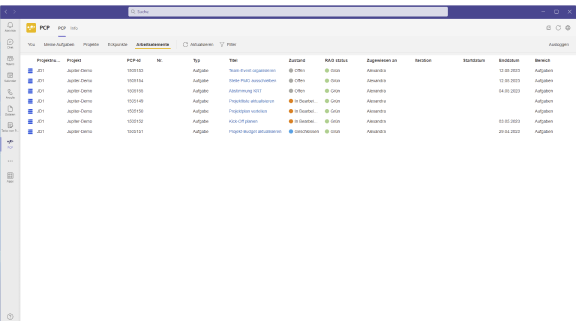
With direct access to important project information within PCP, data can be effortlessly integrated into daily exchanges. This connection creates an efficient work environment in which team members can seamlessly access resources and share information.

Easy Integration Via
Microsoft Teams
Directly Available to all
Users
reduce Media Disruptions
Effortless Project Management: PCPx and Microsoft Teams – Your Dynamic Duo!
Versatile Usage Options Via Web and App
The integration offers unlimited flexibility: users can access PCP either via the web browser or the dedicated Microsoft Teams app. The intuitive user interface makes it easy to access PCP within the familiar Microsoft Teams environment.
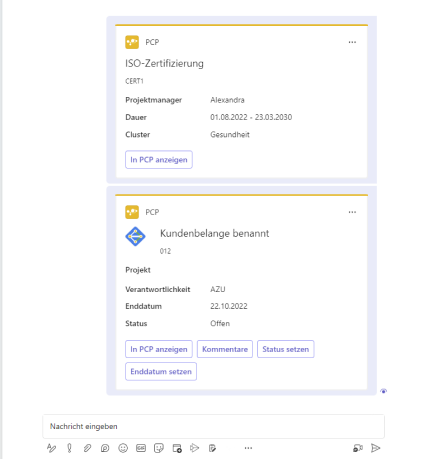
Thanks to interactive message extensions, project elements can be easily searched for and inserted in chats or channels. This seamless fusion of tools optimizes the way you work and promotes smooth communication.
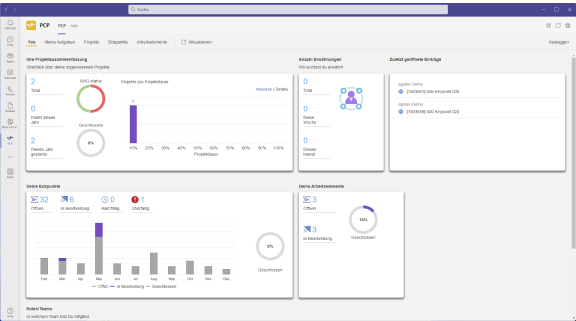
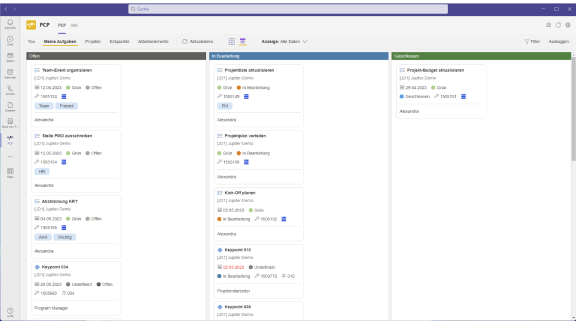
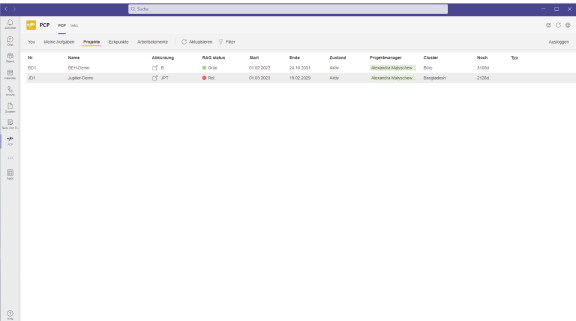
Personal
User Views
Tasks. Deadlines.
Project Map
Simply by Clicking
Maximized Team Synergy: Unleash the Power of PCPx in Microsoft Teams!
Efficient Processing of Project Elements Directly in Teams
The integration goes beyond simply displaying information. Interactive cards allow direct editing of project elements within Microsoft Teams. Status updates and comments on important milestones can be made directly in the familiar Teams environment.
This makes it easier to update project progress and promotes real-time collaboration without having to open additional applications.